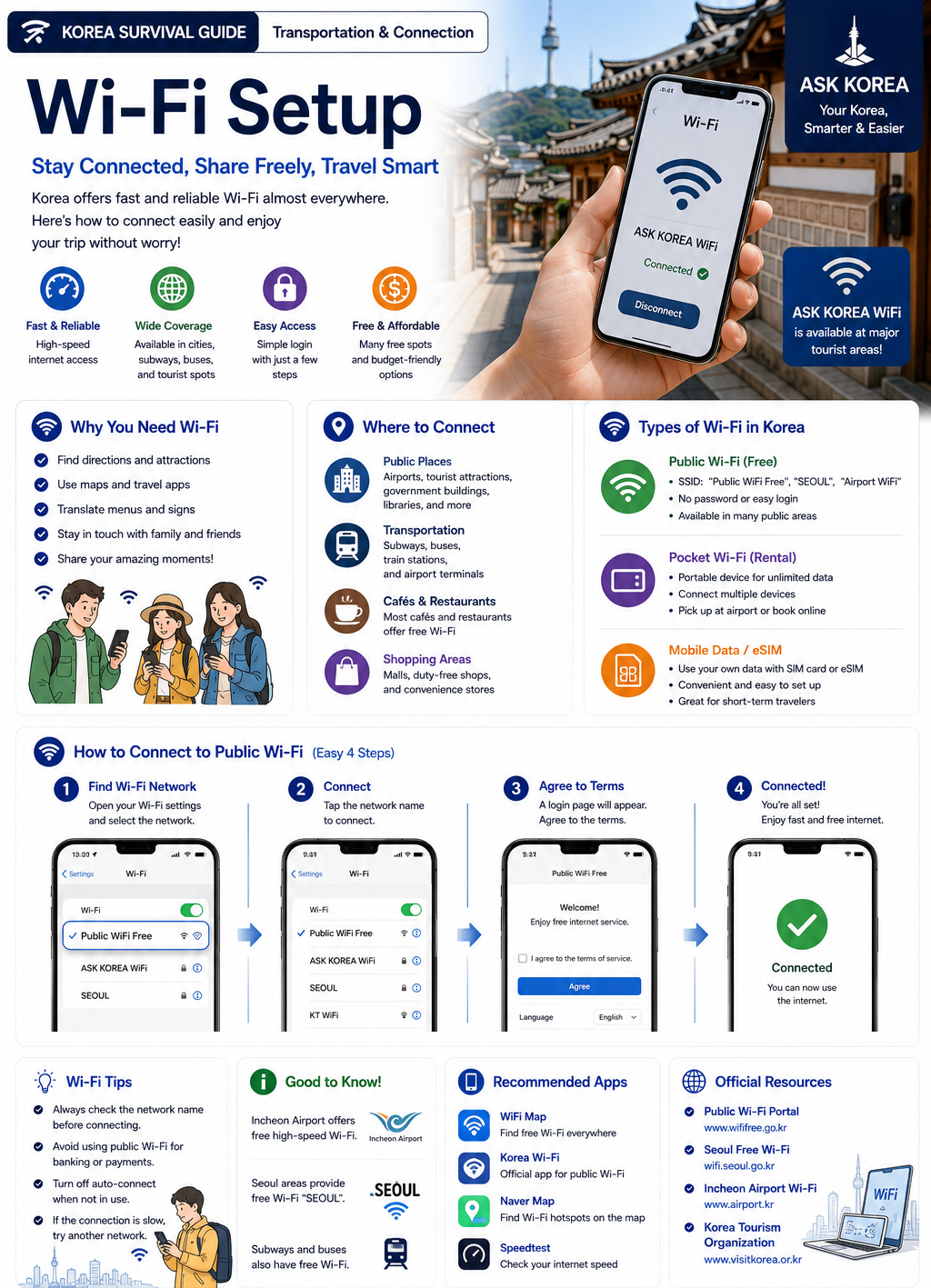
Quick Summary
Wi-Fi setup means connecting your phone, tablet, or laptop to internet networks in Korea. Korea has many public Wi-Fi networks, but Wi-Fi alone is usually NOT enough for full survival in Korea.
Key takeaways
- You need internet for maps, translation, taxi apps, transportation, restaurants, messaging, and hotel communication.
- Free Wi-Fi is common in cafés, subway stations, airports, hotels, restaurants, shopping malls, and some convenience stores.
- Common Wi-Fi network names: KT WiFi, SK WiFi, U+ WiFi, café Wi-Fi, and Public WiFi.
- Some networks require a password or phone verification.
- Wi-Fi works best for cafés, hotels, and airports; SIM/eSIM is better for walking navigation, taxi apps, and daily transportation.
- For most visitors, mobile data matters more than public Wi-Fi.
- Public Wi-Fi can be slow, disconnect frequently, or have login page issues — this is why most foreigners still use SIM/eSIM data.
Official resources
- Visit Korea — Official travel information for foreign visitors to Korea.
Why It Matters
Many visitors assume free Wi-Fi will be enough in Korea. However, internet access is often needed while walking, riding buses, or using transportation apps — which is why most visitors use both Wi-Fi and mobile data.
Korea is highly connected
Korea has very fast internet, strong mobile usage, and app-based systems. Many Korean services assume you always have internet access.
Wi-Fi vs SIM/eSIM
Wi-Fi is best for cafés, hotels, and airports. SIM/eSIM is best for maps while walking, taxi apps, subway travel, and daily transportation.
Korean internet speed surprises visitors
Many foreigners are surprised by Korea's internet speed, especially on the subway, in cafés, and on mobile data.
Public Wi-Fi has real limits
Slow speed, frequent disconnects, login page issues, and weak signal are common — most foreigners still rely on SIM/eSIM mobile data.
Step-by-Step Guide
- 01
1. Where to find Wi-Fi in Korea
Free Wi-Fi is common in cafés, subway stations, airports, hotels, restaurants, shopping malls, and some convenience stores. Korea is highly connected digitally.
- 02
2. What Korean Wi-Fi looks like
Common Wi-Fi names include KT WiFi, SK WiFi, U+ WiFi, Cafe Wi-Fi, and Public WiFi. Some networks require a password or phone verification.
- 03
3. How to connect to Wi-Fi
Open Wi-Fi settings, find an available network, select the Wi-Fi, enter the password, and connect.
- 04
4. Cafe Wi-Fi system
Most Korean cafés provide Wi-Fi. The password is often found on the receipt, on the table, at the counter, or on wall signs. Many Koreans study or work in cafés and use laptops for long hours, so café Wi-Fi usage is very common in Korea.
- 05
5. Subway Wi-Fi system
Many subway stations and trains provide Wi-Fi, but connection quality may vary and public subway Wi-Fi can disconnect often. Overall, Korean subway internet (including mobile signal) is usually very strong — even underground, maps work well, videos load quickly, and messaging works normally, which often surprises foreigners.
- 06
6. Hotel Wi-Fi system
Hotels usually provide free Wi-Fi, a room password, and lobby Wi-Fi. Some hotel Wi-Fi can be slow.
- 07
7. Public Wi-Fi problems
Common problems include slow speed, frequent disconnects, login page issues, and weak signal. Because of this, most foreigners still use SIM/eSIM data. Some public Wi-Fi networks may also be unsafe — avoid suspicious networks, unknown login pages, and personal banking on public Wi-Fi; use trusted networks whenever possible.
- 08
8. Login page issues
Some public Wi-Fi networks require a login page after connecting. Foreigners sometimes think the Wi-Fi is broken when really they just need to complete the login page. Always check if a login page appears after connecting.
- 09
9. Korean internet culture
Korea has very fast internet, strong mobile usage, and app-based systems. Many Korean services assume 'you always have internet.'
Important Tips
Use SIM/eSIM together with Wi-Fi
Combining mobile data with Wi-Fi gives the most reliable coverage.
Screenshot passwords
Save Wi-Fi passwords as screenshots so you don't need to search for them again.
Use café Wi-Fi carefully
Café Wi-Fi is common and convenient, but be mindful of security on shared networks.
Prepare backup internet
Don't rely solely on public Wi-Fi — have mobile data as a backup.
Download maps offline if possible
Offline maps help during internet problems, especially on long trips.
Bring a portable charger
Without battery, maps, translation apps, and taxi apps stop working. Portable chargers are highly recommended.
Common Mistakes
Don't
Depending only on free Wi-Fi.
Do
Combine Wi-Fi with mobile data (SIM/eSIM) since Wi-Fi alone is not always available while walking or traveling.
Don't
Forgetting to check the Wi-Fi password.
Do
Look for it on the receipt, table, counter, or wall signs at cafés, or ask staff.
Don't
Connecting to the wrong network.
Do
Confirm the exact network name (e.g. KT WiFi, SK WiFi, U+ WiFi) before entering a password.
Don't
Using insecure public Wi-Fi for banking.
Do
Avoid suspicious networks and personal banking on public Wi-Fi — use trusted networks only.
Don't
Having no backup mobile data.
Do
Prepare SIM/eSIM mobile data as backup in case public Wi-Fi disconnects or is unreliable.
Frequently Asked Questions
Is free Wi-Fi common in Korea?+
Yes, it is common in cafés, subway stations, airports, hotels, restaurants, and shopping malls.
Is public Wi-Fi reliable?+
Sometimes unstable — it can be slow, disconnect frequently, or require a login page.
Do cafés usually provide Wi-Fi?+
Usually yes, and the password is often on the receipt, table, counter, or wall sign.
Do I still need a SIM card if Wi-Fi is available?+
Usually yes. Wi-Fi is not always available while traveling, and mobile data provides much more flexibility.
Official Resources
Ask AI About This Topic
Have a question about Wi-Fi Setup — Getting Online Around Korea.?
Get instant, locally-checked answers from the ASK KOREA AI. Ask anything from specific edge cases to itinerary decisions.
"I don't want to buy a Korean SIM card — can I survive a 5-day Seoul trip using only café, hotel, and subway Wi-Fi?"