Quick Summary
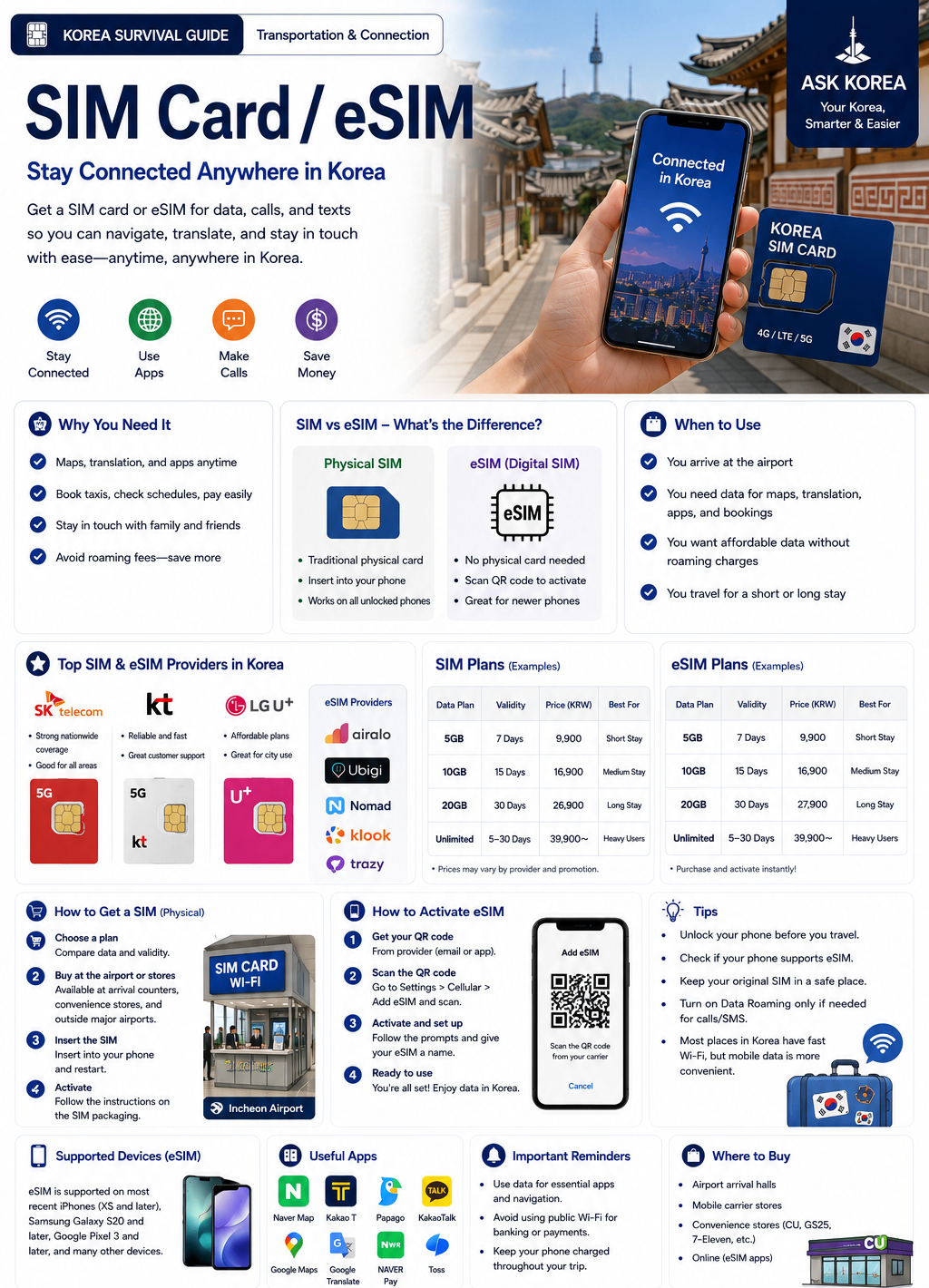
A SIM card or eSIM allows foreigners to use mobile data and phone service in Korea. Without internet, navigation becomes difficult, taxi apps are hard to use, translation apps are impossible, and daily survival becomes stressful.
Key takeaways
- SIM Card: a physical chip inserted into the phone. Useful for older phones and devices that don't support eSIM.
- eSIM: a digital SIM with no physical card. Useful for fast setup, no physical swap, and modern smartphones.
- You need internet for KakaoMap, Naver Map, Kakao Taxi, translation apps, hotel communication, food delivery, and subway navigation.
- Available for purchase at Incheon Airport, mobile carrier stores, some convenience stores, and online (in advance).
- Main Korean telecom companies: SK Telecom, KT, and LG U+.
- Passport is usually required to buy a Korean SIM card.
- Turn off international roaming before using a Korean SIM or eSIM to avoid unexpected charges.
Official resources
- Visit Korea — Official travel information for foreign visitors to Korea.
- KT Roaming — Official roaming, SIM card and eSIM information from KT.
- SK Telecom — Official prepaid SIM, roaming and mobile service information.
Why It Matters
Many Korean services depend heavily on mobile internet. Without internet access, daily tasks can become much more difficult — maps, transportation apps, translation tools, and communication often require mobile data. For most visitors, internet access becomes a basic survival tool.
Korea is highly digital
Foreigners need internet for KakaoMap, Naver Map, Kakao Taxi, translation apps, hotel communication, food delivery, and subway navigation.
SIM vs eSIM
SIM cards suit older smartphones, long-term visitors, and those who prefer a physical card. eSIM suits modern smartphones, fast setup, and short-term travelers.
Airport Wi-Fi bridges the gap
Incheon Airport usually provides free Wi-Fi, useful for downloading apps, contacting your hotel, checking maps, and setting up SIM/eSIM before activation.
Phone verification is common
Some Korean apps and services require a Korean phone number, SMS verification, and identity confirmation, which may confuse foreigners.
Step-by-Step Guide
- 01
1. SIM Card vs eSIM
SIM Card is a physical chip inserted into your phone — useful for older phones and eSIM-unsupported devices. eSIM is a digital SIM without a physical card — useful for fast setup, no physical swap, and modern smartphones. For most modern phones, eSIM is usually the easiest option.
- 02
2. Where to buy
Available at Incheon Airport, mobile carrier stores, some convenience stores, and online. Main Korean telecom companies are SK Telecom, KT, and LG U+.
- 03
3. What it looks like
A SIM card is usually a small plastic chip. An eSIM is usually set up through a QR code.
- 04
4. How to install a SIM card
Turn off your phone, open the SIM tray, insert the SIM card, restart the phone, and the mobile network activates.
- 05
5. How to install an eSIM
Open settings, select mobile network, scan the QR code, activate the eSIM, and restart if needed. Not all phones support eSIM — check compatibility before buying. Be careful when setting up: some foreigners scan the wrong QR code, delete the QR accidentally, or fail the activation process. Follow the setup instructions carefully.
- 06
6. Airport SIM setup
At Incheon Airport, SIM counters are available with English support often available and fast activation. Many foreigners buy a SIM at the airport immediately. Incheon Airport usually provides free Wi-Fi, useful for downloading apps, contacting your hotel, checking maps, and setting up SIM/eSIM — many foreigners use airport Wi-Fi before activating their SIM.
- 07
7. Data plans in Korea
Common plans cover 3, 5, 7, 15, and 30 days. Some plans include unlimited data, a Korean phone number, and calls.
- 08
8. Wi-Fi vs mobile data
Korea has many free Wi-Fi areas, but public Wi-Fi alone is not enough for survival — mobile data is strongly recommended. Korean subway systems usually have strong mobile signal, stable internet connection, and public Wi-Fi in some areas, which often surprises foreigners.
- 09
9. Roaming warning
Some travelers forget to turn off international roaming, resulting in unexpected charges. Before using a Korean SIM or eSIM, check your roaming settings and confirm your mobile network settings — this simple step can prevent expensive mistakes.
- 10
10. Korean internet culture
Korea depends heavily on mobile internet. Many systems require phone verification, apps, and mobile maps. Internet problems can affect daily survival. Some Korean apps and services require a Korean phone number, SMS verification, and identity confirmation, which may confuse foreigners.
Important Tips
Check eSIM compatibility before travel
Not all phones support eSIM — confirm your device supports it before buying.
Screenshot your QR code
Keep a saved copy of your eSIM QR code in case you need to reinstall it.
Airport purchase is easiest
SIM counters at Incheon Airport often have English support and fast activation.
Unlimited data is recommended
For heavy map and app usage, an unlimited data plan avoids running out mid-trip.
Turn off roaming
Check your roaming settings before activating a Korean SIM or eSIM to avoid unexpected charges.
Bring a portable charger
Without battery, maps, translation apps, and transportation all become difficult. Portable chargers are strongly recommended.
Screenshot before landing
Save screenshots of your hotel address, airport transportation guide, SIM activation instructions, and emergency contacts in case internet access is delayed.
Bring your passport
A passport is usually required to buy a Korean SIM card.
Common Mistakes
Don't
Buying an eSIM without checking phone compatibility.
Do
Confirm your phone supports eSIM before purchasing.
Don't
Forgetting your passport.
Do
Bring your passport — it is usually required to buy a Korean SIM card.
Don't
Getting the wrong SIM size.
Do
Confirm the SIM size your phone needs before purchase, or let the store staff handle it.
Don't
No internet after setup.
Do
Follow activation instructions carefully; restart your phone if needed.
Don't
Confusing data limits.
Do
Check whether your plan includes unlimited data or a fixed data cap.
Don't
Leaving international roaming active.
Do
Turn off roaming before or immediately after activating your Korean SIM or eSIM.
Frequently Asked Questions
Is eSIM better than a SIM card?+
It depends on phone compatibility — eSIM is convenient for modern smartphones, but not all phones support it.
Can foreigners buy Korean SIM cards?+
Yes. A passport is usually required.
Should I buy a SIM/eSIM before arriving in Korea?+
Not necessarily. Many visitors purchase SIM cards or eSIMs after arriving, especially at Incheon Airport, where counters offer fast activation and English support.
What if my phone doesn't support eSIM?+
Use a physical SIM card instead, which is widely available at the airport, carrier stores, and some convenience stores.
Do I need to worry about roaming charges?+
Yes — turn off international roaming before using your Korean SIM or eSIM to avoid unexpected charges.
Official Resources
Ask AI About This Topic
Have a question about SIM Card / eSIM — Getting Online the Moment You Land.?
Get instant, locally-checked answers from the ASK KOREA AI. Ask anything from specific edge cases to itinerary decisions.
"My phone is an iPhone 13 — should I buy a physical SIM or an eSIM at Incheon Airport, and how many days of data should I get for a 10-day trip?"