Quick Summary
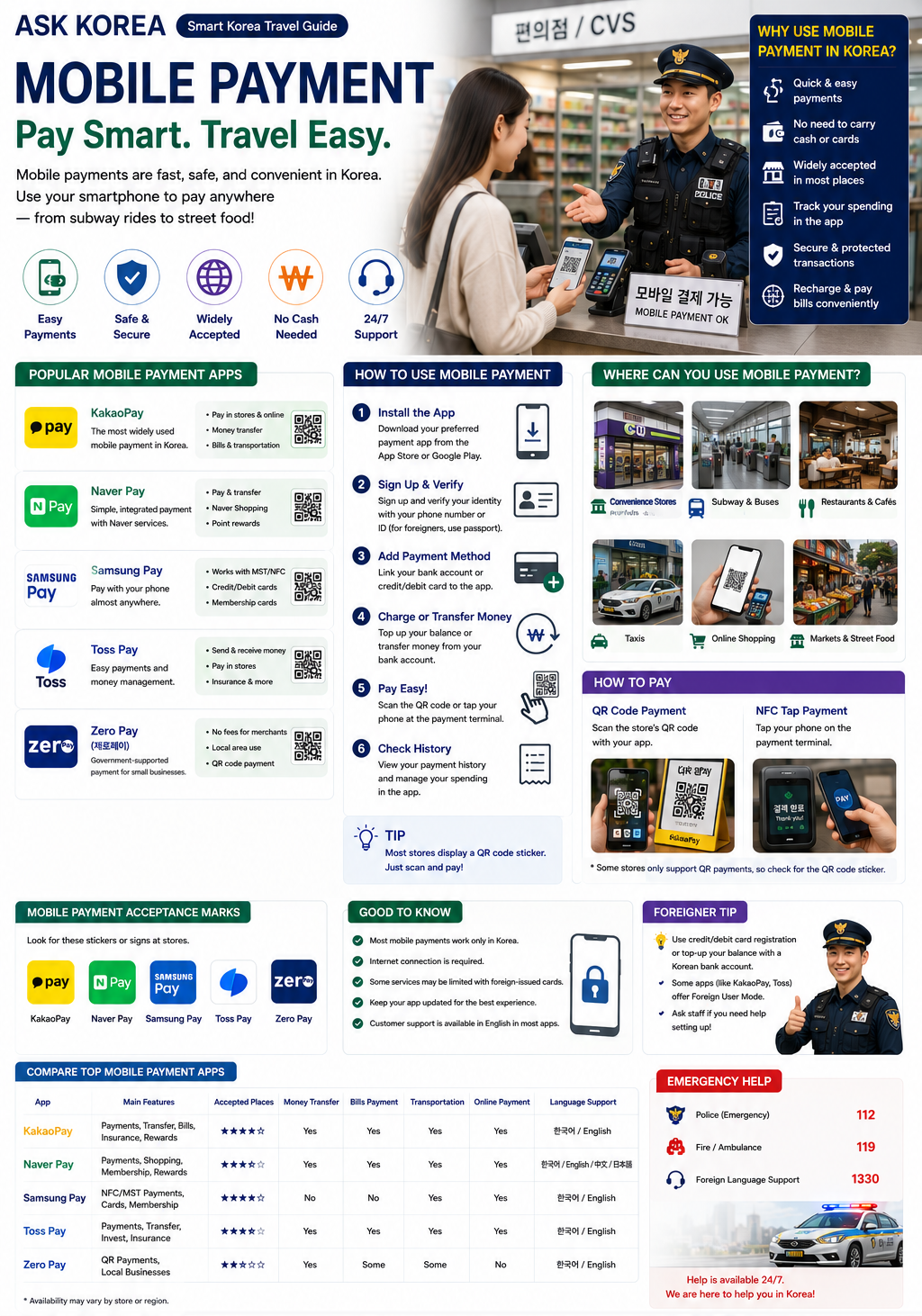
Many Koreans pay with Samsung Pay, Naver Pay and Kakao Pay every day. Foreigners usually rely on physical cards instead, but Korea's fast, contactless payment culture is worth understanding either way.
Key takeaways
- Popular apps: KakaoPay, Naver Pay, Samsung Pay, Toss Pay, Zero Pay.
- Many Koreans use Samsung Pay, Naver Pay and Kakao Pay day to day, while foreigners usually use physical cards.
- Works at convenience stores, subways and buses, taxis, restaurants, online shopping and street markets.
- Pay by scanning a store QR code or tapping your phone on the NFC terminal.
- Korea is known for fast payment systems — most transactions take only a few seconds, and foreigners are often surprised by contactless payment, mobile payments and fast checkout.
- Sign-up usually requires a Korean phone number or ID, though some apps (KakaoPay, Toss) offer a Foreign User Mode with English support and passport registration.
Why It Matters
Cash usage in Korea is decreasing as tap payments, credit cards and mobile payments take over. Understanding how mobile payment works — even if you end up relying on a physical card — helps you understand Korea's checkout culture and move faster in line.
Korea's payment culture is built for speed
Most transactions take only a few seconds, and contactless and mobile payments are the norm rather than the exception.
Cash usage is decreasing
People commonly use tap payments, credit cards and mobile payments, so carrying a card or phone matters more than carrying cash.
Foreigners typically default to cards
While locals lean on Samsung Pay, Naver Pay and Kakao Pay, most foreign visitors use physical cards, since full app sign-up can require a Korean phone number or ID.
Step-by-Step Guide
- 01
1. Know the major apps
KakaoPay, Naver Pay, Samsung Pay, Toss Pay and Zero Pay are the apps you'll see used most often.
- 02
2. Check what sign-up requires
Registration usually requires a Korean phone number or ID; some apps like KakaoPay and Toss offer a Foreign User Mode with English support for passport-based registration.
- 03
3. Look for the payment method at checkout
You'll be asked to scan a store QR code or tap your phone on the NFC terminal, depending on the store.
- 04
4. Use it wherever it's supported
Convenience stores, subways and buses, taxis, restaurants, online shopping and street markets commonly accept mobile payment.
- 05
5. Keep a card as backup
Most mobile payment services only work inside Korea and require an internet connection, so a physical card remains the reliable fallback most foreign visitors use.
Important Tips
Look for the QR code or NFC symbol
Stores display how they accept mobile payment — scan a QR code or tap your phone on the terminal.
Expect fast checkout
Korea's payment systems are built for speed — most transactions finish in just a few seconds.
Foreign User Mode helps
KakaoPay and Toss offer an English-friendly Foreign User Mode for visitors registering with a passport.
You need an internet connection
Most mobile payment services only work inside Korea and require you to be online.
Foreigners usually rely on physical cards
It's normal and reliable to skip app sign-up entirely and pay by card instead.
Cash usage is decreasing
Don't count on cash-only alternatives everywhere — tap payments, cards and mobile payments dominate.
Common Mistakes
Don't
Assuming every mobile payment app works instantly for foreigners.
Do
Sign-up usually requires a Korean phone number or ID — check for a Foreign User Mode like the ones on KakaoPay or Toss.
Don't
Relying on mobile payment outside Korea.
Do
Most services only work inside Korea and require an internet connection.
Don't
Not having a backup payment method.
Do
Keep a physical card ready, since most foreigners use cards rather than mobile payment apps.
Don't
Expecting cash to be the norm.
Do
Cash usage is decreasing — tap payments, credit cards and mobile payments are now common.
Frequently Asked Questions
What mobile payment apps are popular in Korea?+
KakaoPay, Naver Pay, Samsung Pay, Toss Pay and Zero Pay.
Can foreigners use Korean mobile payment apps?+
Sign-up usually requires a Korean phone number or ID, but some apps like KakaoPay and Toss offer a Foreign User Mode with English support.
Do foreigners usually use mobile payment in Korea?+
Usually not — foreigners typically use physical cards instead.
Where does mobile payment work in Korea?+
Convenience stores, subways and buses, taxis, restaurants, online shopping and street markets.
Can I use Apple Pay in Korea?+
Some stores support it, but availability varies.
Official Resources
Ask AI About This Topic
Have a question about Mobile Payment — Korea's Fast, Cashless Checkout.?
Get instant, locally-checked answers from the ASK KOREA AI. Ask anything from specific edge cases to itinerary decisions.
"As a foreign tourist, which Korean mobile payment app is easiest to set up with just a passport and international credit card?"