Quick Summary
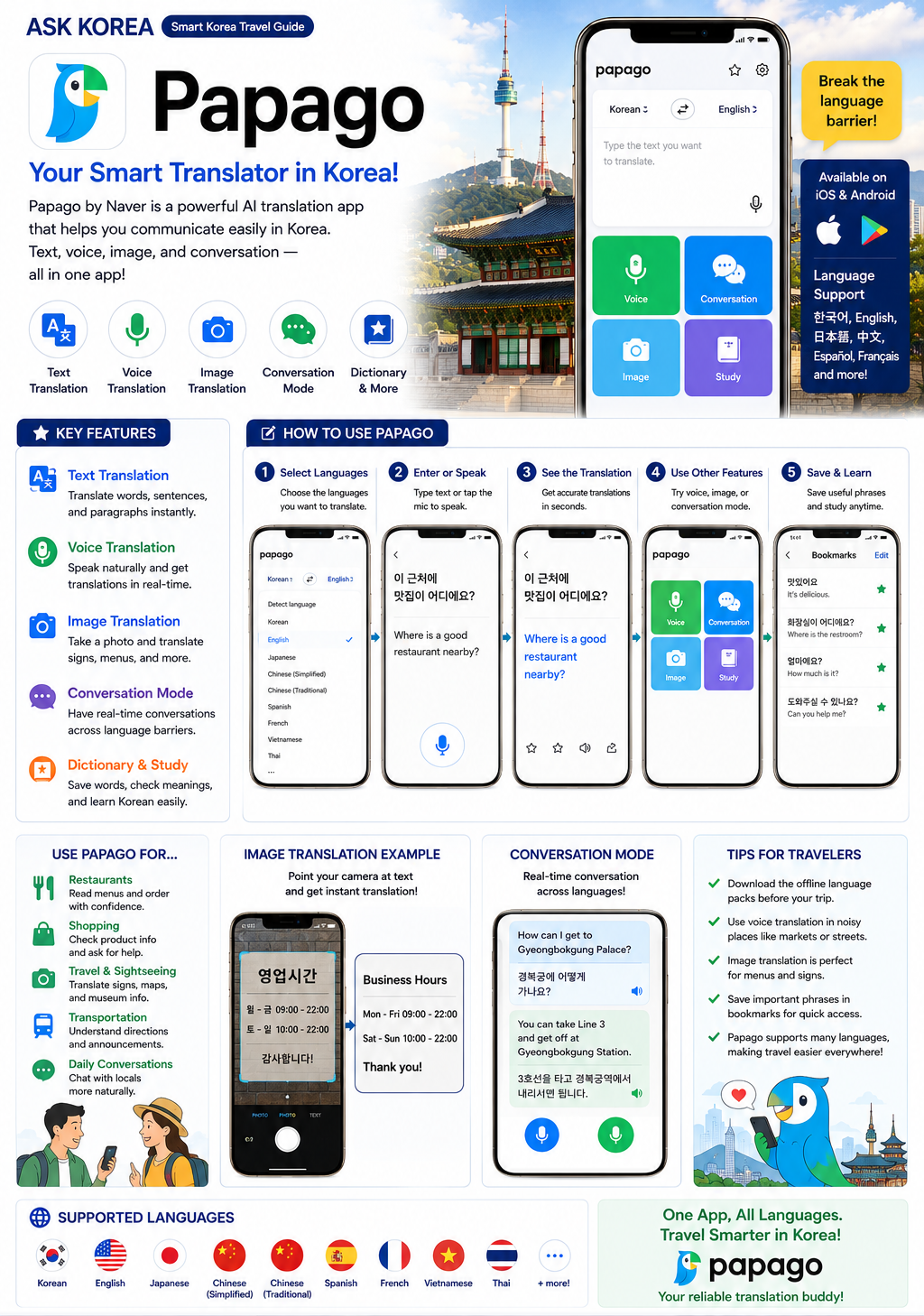
Papago's purpose is translation, voice translation, image translation, and conversation mode. It is recommended for beginners in Korean.
Key takeaways
- Purpose: translation, voice translation, image translation, and conversation mode.
- Recommended for beginners.
- One of the ASK KOREA Top 3 Essential Apps, alongside KakaoMap and Kakao T.
- Google Translate is a useful backup translation tool, with camera and instant translation.
- Part of the Korea Survival Set: KakaoMap + Kakao T + Papago.
- Useful in delivery situations too — helps with Korean phrases and addresses.
Why It Matters
Korea is a highly app-based society, and translation becomes difficult without the right app. Papago helps foreigners communicate in daily situations like ordering food, asking directions, or talking to a taxi driver.
Without a translation app
Translation becomes difficult, and understanding Korean becomes a major barrier for foreigners.
Papago vs Google Translate
Papago is often recommended for Korean and recommended for beginners. Google Translate can be useful as a backup translation tool with camera and instant translation.
Part of the Korea Survival Set
KakaoMap + Kakao T + Papago make up the ASK KOREA recommended Korea Survival Set — if you install only three apps before arriving in Korea, start with these.
Real survival situation
Cannot understand Korean? Open Papago and use conversation mode to communicate directly with someone.
Step-by-Step Guide
- 01
1. What is Papago for?
Papago's purpose is translation, voice translation, image translation, and conversation mode. It is recommended for beginners.
- 02
2. Install the app
Download Papago before arriving in Korea — it is one of the ASK KOREA Top 3 Essential Apps.
- 03
3. Text translation
Type or paste Korean text to get an instant translation.
- 04
4. Voice translation
Speak into the app to translate conversation in real time.
- 05
5. Image translation
Take a photo of a menu, sign, or document to translate the text directly from the image.
- 06
6. Conversation mode
Use conversation mode for back-and-forth communication, useful when you cannot understand Korean at all.
- 07
7. Backup with Google Translate
Google Translate's purpose is translation, camera translation, and instant translation. It is a useful backup translation tool alongside Papago.
- 08
8. Use Papago with maps and delivery apps
Pro tip: use Papago together with maps like KakaoMap. Papago is also useful for delivery situations, such as translating Korean phrases and addresses when ordering food.
Important Tips
Install before arrival
Papago is one of the three essential apps (with KakaoMap and Kakao T) — install before you land in Korea.
Use Papago together with maps
Combine Papago with KakaoMap or Naver Map when place names or signs are in Korean.
Use image translation for menus
Take a photo of a restaurant menu to translate it instantly.
Use voice translation for conversations
Speak naturally and get real-time translations when talking with locals.
Use conversation mode
Great for back-and-forth communication when you cannot understand Korean.
Keep Google Translate as backup
Google Translate is a useful backup translation tool with camera and instant translation.
Common Mistakes
Don't
Having no translation app installed.
Do
Install Papago before arrival — it is recommended for beginners and one of the Top 3 Essential Apps.
Don't
Relying only on one translation app.
Do
Use Papago as your main app, and Google Translate as a useful backup with camera and instant translation.
Don't
Not using image translation for menus or signs.
Do
Use Papago's image translation feature to instantly translate Korean menus and signs.
Don't
Not combining a translation app with a map app.
Do
Use Papago together with maps like KakaoMap for a smoother experience.
Frequently Asked Questions
Which translation app is best?+
Papago is often recommended for Korean. Google Translate can be useful as a backup.
Should I install Papago before arriving?+
Yes. It can make communication much easier from the moment you arrive.
What is the recommended app combination with Papago?+
KakaoMap + Kakao T + Papago make up the Korea Survival Set, the ASK KOREA recommended combination.
What should I do if I cannot understand Korean at all?+
Open Papago and use conversation mode to communicate directly.
Official Resources
Ask AI About This Topic
Have a question about Papago — Korea's Recommended Translation App.?
Get instant, locally-checked answers from the ASK KOREA AI. Ask anything from specific edge cases to itinerary decisions.
"How do I use Papago to translate a Korean restaurant menu with the camera?"