Quick Summary
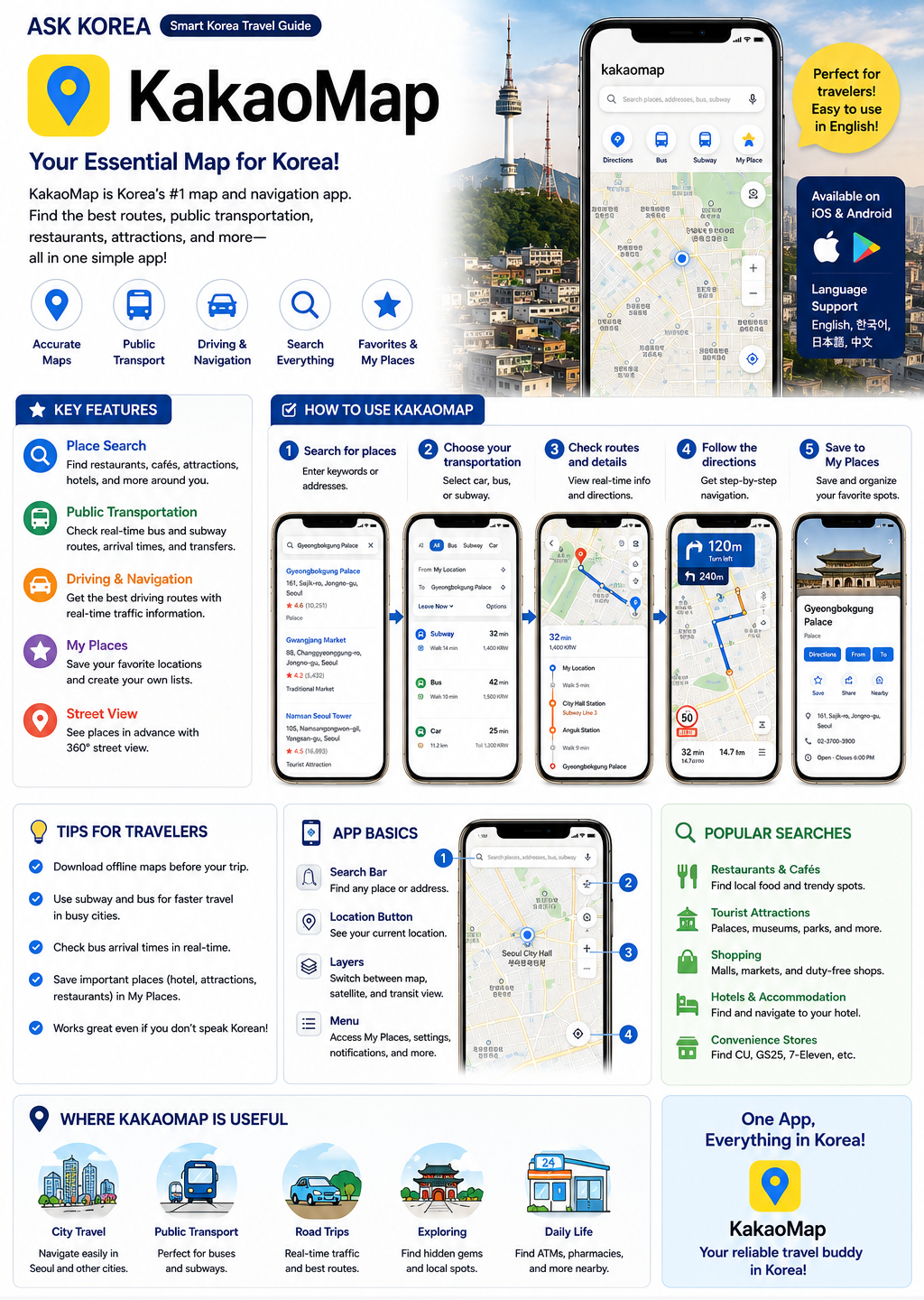
Korea is a highly app-based society. KakaoMap is the strongly recommended navigation app for finding your way, and one of the top 3 essential apps for surviving in Korea, alongside Kakao T and Papago.
Key takeaways
- Purpose: navigation, directions, restaurants, subway routes, and bus routes.
- Strongly recommended — one of the ASK KOREA Top 3 Essential Apps.
- Best for: simple navigation, Kakao T taxi integration, and tourist use.
- Google Maps does NOT work perfectly in Korea — KakaoMap gives more accurate results.
- Many foreigners start with KakaoMap before trying Naver Map.
- Recommended to install before arriving in Korea.
Why It Matters
Korea is a highly app-based society, and many daily activities are easier when using local apps. Transportation, navigation, translation, and food delivery often depend on mobile apps — installing key apps before arrival can save a lot of time.
Without KakaoMap
Getting around becomes difficult, finding locations becomes difficult, and transportation becomes confusing.
Google Maps limitation
Google Maps does NOT work perfectly in Korea. KakaoMap and Naver Map provide more accurate information for navigation.
Part of the Korea Survival Set
The best app combination for Korea is KakaoMap + Kakao T + Papago. This is the ASK KOREA recommended set for tourists, long-term visitors, and students alike.
Real survival situation
Lost in Seoul? Open KakaoMap, search your destination, and use Papago if you need translation help along the way.
Step-by-Step Guide
- 01
1. What is KakaoMap for?
KakaoMap's purpose is navigation, directions, restaurants, subway routes, and bus routes. It is recommended as one of the most important apps in Korea.
- 02
2. Install the app
Download KakaoMap before arriving in Korea if possible, especially since it is one of the three essential apps (with Kakao T and Papago).
- 03
3. Allow location permission
Allow location access so KakaoMap can find your current position and give accurate directions.
- 04
4. Search your destination
Type in the name of a restaurant, attraction, subway station, or address to search for it.
- 05
5. Follow route guidance
KakaoMap will show subway routes, bus routes, walking directions, or driving directions. Follow the on-screen guidance to reach your destination.
- 06
6. KakaoMap vs Naver Map
KakaoMap is best for simple navigation, Kakao T taxi integration, and tourist use. Naver Map is best for detailed local information, restaurants, and reviews. Many foreigners start with KakaoMap.
- 07
7. Why not just use Google Maps?
Google Maps does NOT work perfectly in Korea. KakaoMap and Naver Map are recommended instead because they provide more accurate information for navigation, transit, and directions.
- 08
8. Use with the English subway map
For subway travel, it helps to also be familiar with the Seoul Subway English Map, line color guide, transfer station guide, and exit number examples — one of the most useful resources for foreigners.
Important Tips
Install before arrival
Especially KakaoMap, Kakao T, and Papago — install these before you land in Korea.
Save your hotel address
Save your hotel address in KakaoMap so you can navigate back easily.
Save screenshots
Take screenshots of key routes and addresses in case you lose signal or data.
Save your airport route
Save the route from the airport to your accommodation before you arrive.
Use Papago together with KakaoMap
Combine KakaoMap with Papago for translation when reading Korean-only place names or signs.
Recognize the app icon
Learn to recognize the KakaoMap icon so you can find it quickly on your phone.
Common Mistakes
Don't
Only using Google Maps for navigation in Korea.
Do
Google Maps does NOT work perfectly in Korea. Use KakaoMap or Naver Map for more accurate information.
Don't
Not installing Kakao T alongside KakaoMap.
Do
KakaoMap and Kakao T work well together — KakaoMap for directions, Kakao T for calling a taxi.
Don't
Having no translation app installed.
Do
Use Papago together with KakaoMap when place names or directions are in Korean.
Don't
Having no offline information or screenshot backup.
Do
Save screenshots of your hotel address and key routes in case of connectivity issues.
Frequently Asked Questions
Can I use Google Maps in Korea?+
Yes, but it may not provide the best navigation. KakaoMap and Naver Map are usually better.
Should I install KakaoMap before arriving?+
Yes. It can make airport arrival and getting to your accommodation much easier.
Is KakaoMap or Naver Map better?+
KakaoMap is best for simple navigation, Kakao T taxi integration, and tourist use. Naver Map is best for detailed local information, restaurants, and reviews. Many foreigners start with KakaoMap.
What is the recommended app combination with KakaoMap?+
KakaoMap + Kakao T + Papago make up the Korea Survival Set, the ASK KOREA recommended combination.
Official Resources
Ask AI About This Topic
Have a question about KakaoMap — Korea's #1 Navigation App.?
Get instant, locally-checked answers from the ASK KOREA AI. Ask anything from specific edge cases to itinerary decisions.
"How do I use KakaoMap in English to find the subway route to Gyeongbokgung Palace?"